Search Engine

Custom Search

Friday, November 20, 2009

Give Thanks


Learning how to cluster objects is important. We have all seen cluster in previews of kit, or quick pages. The point is to draw the eye in. Generally your cluster will look better in odd numbers. Important to remember that things don't have to be used as intended. The stem laying in a horizontal manner appears now as a ribbon or border. Add the one berry sprig and it starts changing the look immediately, although a few well placed would have added balance. If adding a few flowers (below left), makes the layout seem more feminine than excluding them, more masculine (below right).
Give Thanks.

Tuesday, November 17, 2009

Big Top


 Big Top.
And I received an email from Jackie at La galerie de Jackie, with an award! Thanks so much. Her blog is filled with her digital artwork. So let's give this a try. I must pass it onto 10 people and reveal 10 things about myself. So I decided to visit all your blogs today (If you've left a comment). Of course a lot of the blogs were family sites, and you all have lovely families. But I did restrict the list to things we can use.
And the award goes to...
  1. http://www.gypsyrose-myblog.blogspot.com/ for card ideas
  2. http://www.sus-xandersmom.blogspot.com/ for Quick pages
  3. http://www.donnasdigitalcreations.blogspot.com/ for Wordart
  4. http://www.themagnoliapatch.blogspot.com/ a template available
  5. http://www.justbeingcrafty.blogspot.com/ Fall Quick pages
And the revealing...
  1. I have been married most of my life.
  2. I think grandchildren are the BEST part of life.
  3. I love to scrapbook.
  4. I enjoy gardening.
  5. I enjoy cooking.
  6. I like to read history.
  7. I like to rake leaves.
  8. I don't like to drive.
  9. I drink to much coffee.
  10. My parents taught me, that if you fall off the horse, get up, dust yourself off and get back on. It seems like a good lesson for life.

Saturday, November 14, 2009

Tiled Alpha

Tile Alpha. I included the 2 tile trays shown and also a second piece for the front rail. It allows you to have the letters "set back in" the tray. Maybe somebody would like to use it for game photo's and not just an alpha. Have fun.

Thursday, November 12, 2009

Happy Birthday


Happy Birthday and the Birthday Cake.
In the preview the green frame was duplicated, the lower layer filled with color and the 5 typed, you can type journaling or dates or ?. Elements don't have to be always used as intended. Have fun.

Tuesday, November 10, 2009

Photoshop Lesson

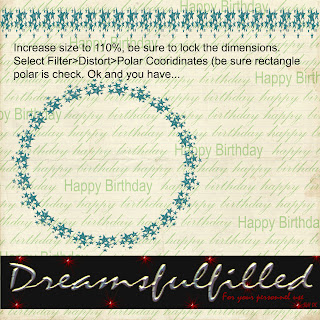
I missed the opportunity to post this, so here we go. You can use any straight element (ribbons and borders) and turn it into a frame or place for your journaling with the polar coordinates filter. If you right click and you can save the photo to your computer (if you want).
  1. Open a new layout, it really should be 12 x 12 inches, so that there is enough room for the filter to work properly.
  2. Click Filter>Distort>Polar Coordinates (at the top) and you are done.
  3. HOWEVER, some elements are not wide enough to connect properly, as was the case of the barbed wire frame, since I was layering them, I just turned the second layer a bit and covered the small gap. BUT if you are not doing that, to correct the gap increase the file to 110% and lock the dimensions together and run the filter in step 2.
  4. Have fun.

Sunday, November 8, 2009

Friday, November 6, 2009

Clear Date Labels


Clear Date Labels. On the top label, I just made a new layer under the label, and used a brush to "stamp" , highlighting the date. All the markers are in red, however we had a lesson in changing colors. Drag it into your layout, click Enhance>Adjust Color>Adjust Hue/Saturation and move the slider to achieve the color you would like. Have fun.